S1TT30 – Technical Manual
Version: 1.0
Revision Date: 19/10/2025
1. Introduction
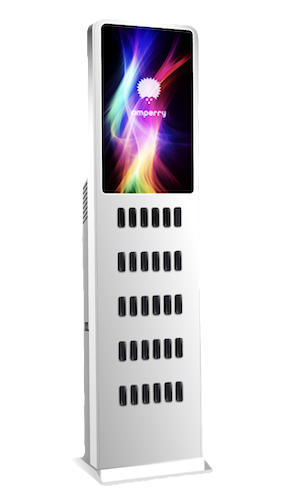
The S1TT30 Station is a smart power bank rental system designed for high-traffic environments like airports, malls, and train stations.
It features:
- A 27-inch touchscreen with vibrant display
- 40 power bank slots (5 rows of 8 compartments)
- Automated locking/unlocking
- Cloud connectivity for monitoring and remote management
2. Key Features
- Display: 27-inch touchscreen with vibrant color display
- Slots: 40 (5 rows × 8 compartments)
- Smart Locking System: Solenoid-based
- Connectivity: Ethernet, Wi-Fi & 4G/LTE
- Upgradable Firmware
- Power Supply: 220V industrial-grade adapters
- Cloud Management
- Modern Design: Sleek, freestanding kiosk with clean aesthetics
3. Typical Applications
- Airports, shopping malls, train stations
- Events & exhibitions
- Urban smart city projects
4. Technical Specifications
Physical
- Dimensions: 180×60 cm (tall, slender rectangular structure)
- Weight: 50 kg
- Material: Metal structure, folded and painted
- Design: Freestanding kiosk with tapered side profile
- Base: Rectangular base wider than main body for stability
Power Bank Management
- Slots: 40 (5 rows of 8 compartments)
- Lock System: Solenoid + spring release
- Control Board: Tomorrow Tech s.r.l.
- Microcontroller: STM32 @ 48 MHz
User Interface
- Interactive App: Rental & Return
Connectivity
- Embedded Computer: Raspberry Pi
- Data: Wi-Fi & USB 4G dongle
- Cloud sync: Remote management
Power
- Input Voltage: 220V
- Consumption: 240 Wh
- Certified Industrial Adapters
Operating Environment
- Temperature: 0°C to 50°C
- Humidity: Up to 90% (non-condensing)
- MTBF: 500,000 hours
5. Operating Logic
For detailed information about the rental and return processes, please refer to the dedicated Integration section which covers all operational workflows, payment processing, and system integration requirements.
6. Compliance & Certifications
Go to certification documentation to see all available certifications of the device.